One batch for many chats
Select accessible conversations together instead of saving every chat manually.
BULK GEMINI EXPORT
Stop opening and downloading Gemini conversations one by one. Gemini Exporter finds the history your account exposes, then saves the chats you select as files on your own device.
Free and open source. Your conversation exports are processed in Chrome and saved to your own device.
Published extension: Google Gemini · ChatGPT, Claude and Grok integrations are experimental.
STEP BY STEP
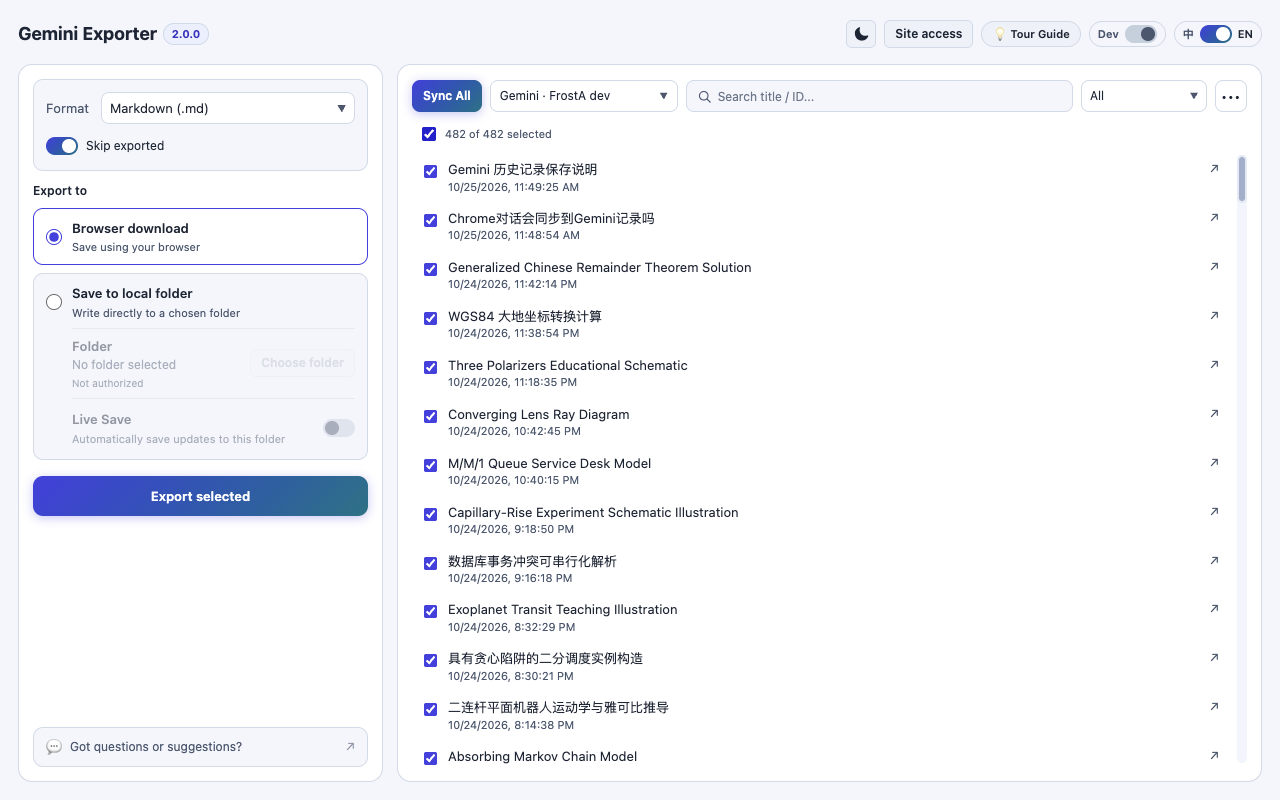
Sync your accessible chat list, choose what to save, and start the export from the Workbench. A scan discovers conversations; it does not create backup files until you export them.
Install Gemini Exporter, grant Gemini access under Site access, sign in to Gemini, and open the Workbench from the extension.
Select Sync All to discover the conversation history Gemini currently exposes. Review the list and wait for scanning to finish.
Select all conversations or only the ones you need. Choose Markdown, PDF, HTML, or JSON, then Browser download or Save to local folder.
Choose Export selected to create the files. Check each status for completion, changes or missing resources. Skip exported can avoid redoing unchanged, fully completed exports.
KNOW WHAT YOU'RE SAVING
Each selected Gemini conversation becomes its own document in the format you choose. For browser downloads, multiple output files are automatically packaged in a ZIP. Saving to an authorized local folder writes the documents directly, which usually works better for very large batches.
The Workbench remembers export status, helping you see which conversations were saved, which changed, and which need attention. Available images or files can be included when you enable attachments; expired or inaccessible resources cannot be reconstructed.
PRACTICAL BENEFITS
Select accessible conversations together instead of saving every chat manually.
Read, search and organize exports without reopening Gemini.
Use status indicators and Skip exported to avoid assuming unfinished exports succeeded.
COMMON QUESTIONS
Based on the published Gemini Exporter workflow and its current limitations.
Complete user guideNo. Sync All updates the local conversation catalog. Export selected is the action that writes backup files to your chosen destination.
You can select large batches, but what an online scan finds depends on Gemini's accessible history. For very large collections, use Save to local folder and supplement the scan with Google Takeout when necessary.
Enable Skip exported. The extension can skip a fully completed export of the matching format when the known source hasn't changed. Changed or incomplete conversations can be exported again.
EXPLORE MORE
READY TO KEEP YOUR CONVERSATIONS?
No exporter account, subscription or developer-hosted upload.